Rebuilding an AI Platform Around the Agent's Workflow
Transforming Atidot from a powerful analytics engine into an action-ready product.
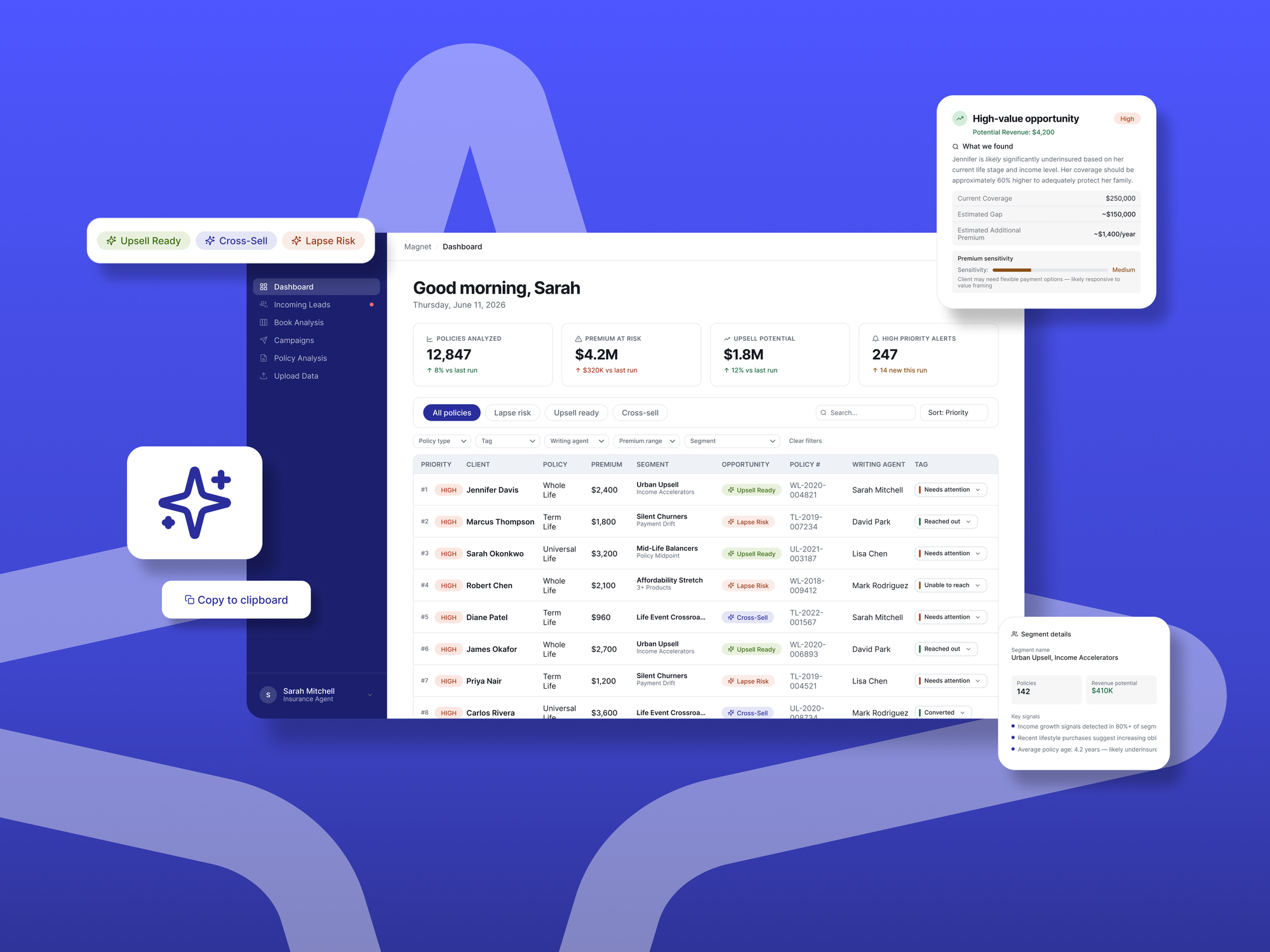
Development impact
My role
I led both the design and product direction for this redesign. As the sole designer I owned the end-to-end experience, and I also took on the product work: defining the problem, prioritizing the roadmap against engineering capacity, aligning sales and leadership on what to build, and deciding what to cut.
Atidot had built genuinely powerful predictive technology. My job was to shape it into a product experience that matched.
The problem
Atidot is an AI-driven analytics platform for the insurance industry, helping carriers, brokers, and agents identify opportunities around policy retention, cross-sell, upsell, and customer engagement. The predictive models were genuinely powerful. Like many deep-tech products, the challenge was translating that technical strength into an experience users could act on.
The platform surfaced valuable predictions, but workflows were fragmented, and many features showed what was possible without building a clear path to doing it. The core problem was simple to say and expensive to ignore: users had to connect the dots themselves.
"We like what it can do, but it doesn't have good functionality."
Prospect, during a sales call"I still need to put the puzzle together."
Insurance brokerUsers struggled to answer practical questions: Who should I call today? Why is this customer being flagged? What should I say to them? At the same time, insurance organizations were deeply attached to their existing CRMs and weren't looking to replace them. They wanted tools that fit into their current processes with minimal friction.
What I inherited
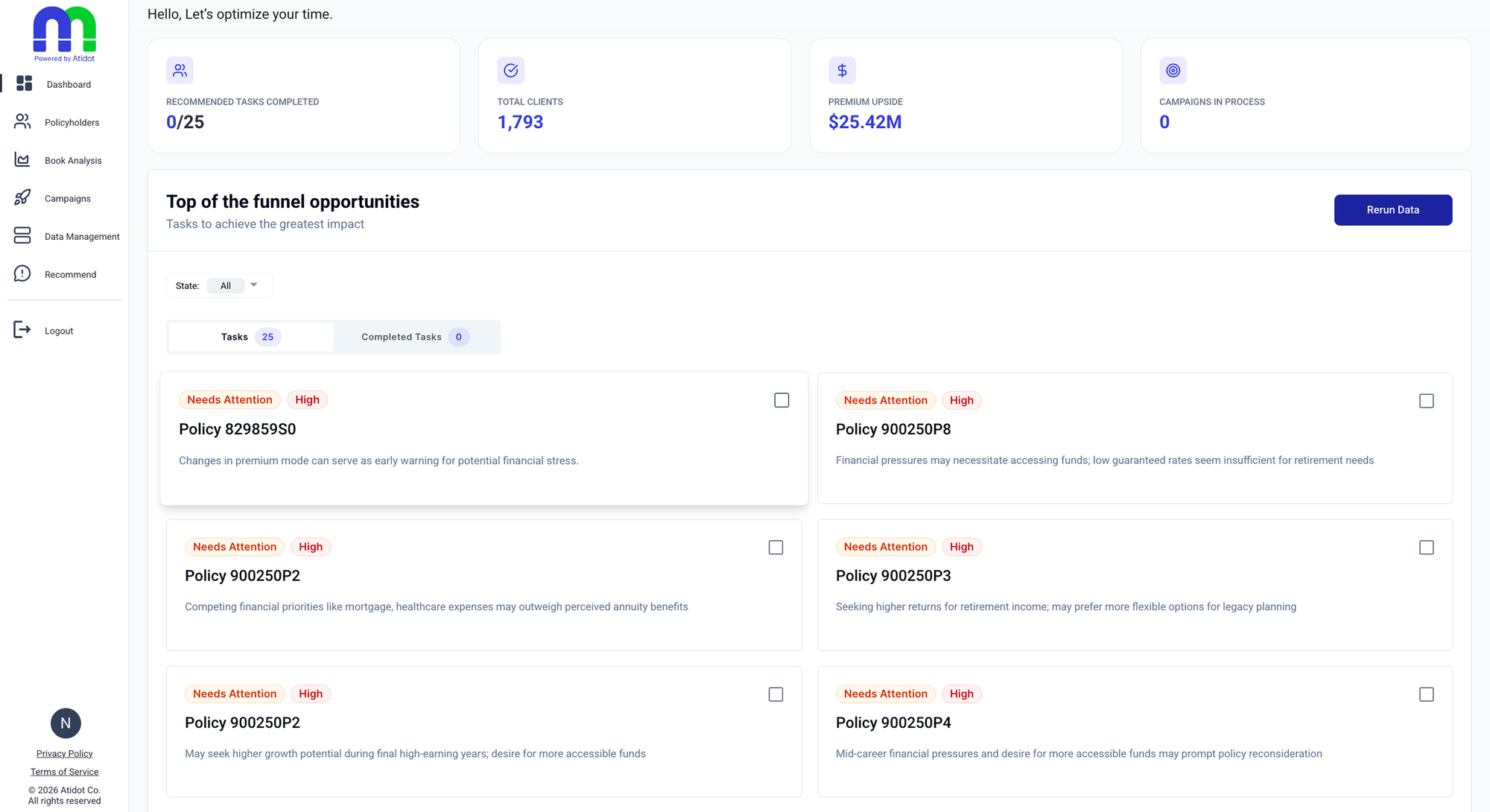
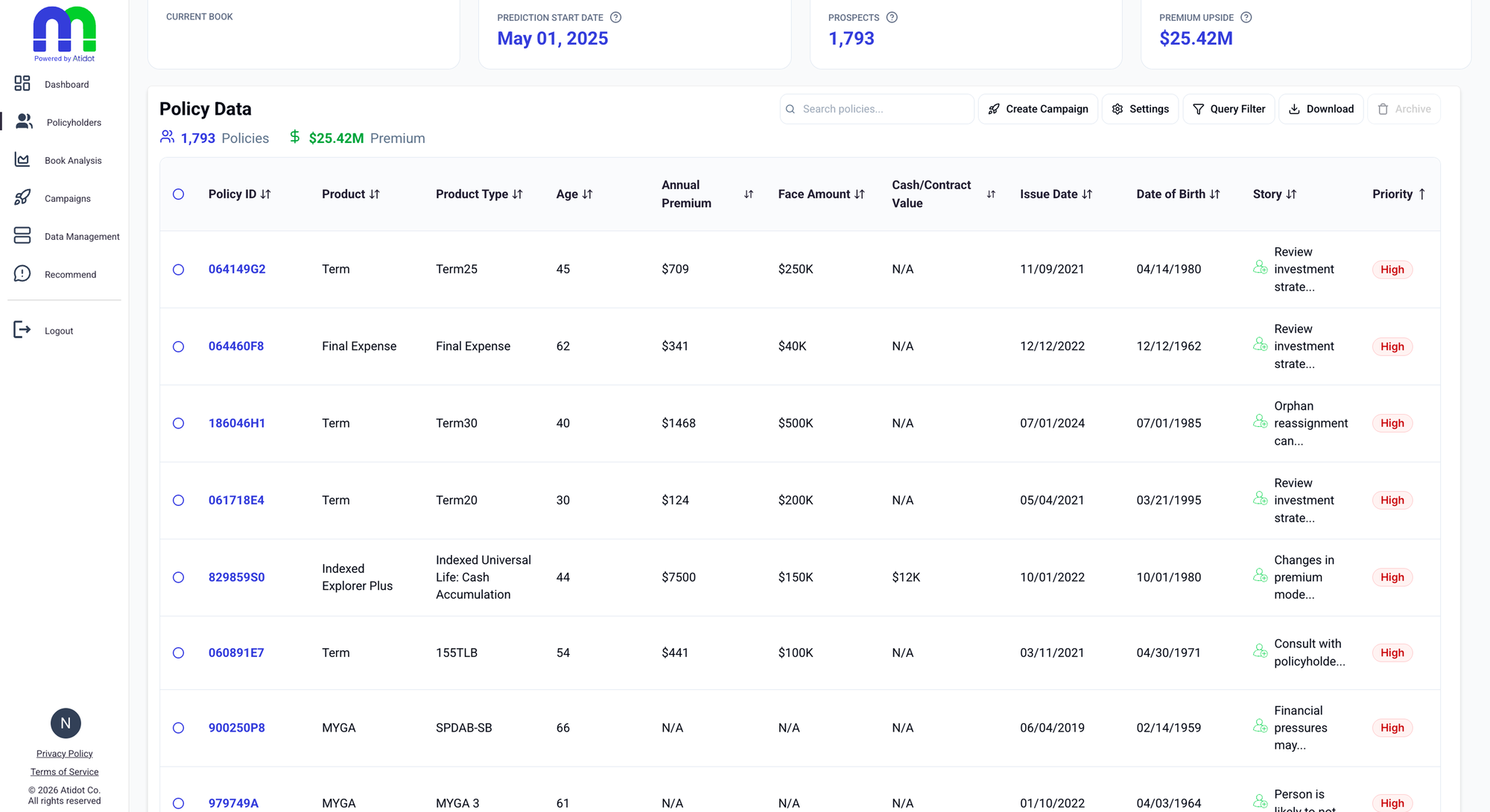
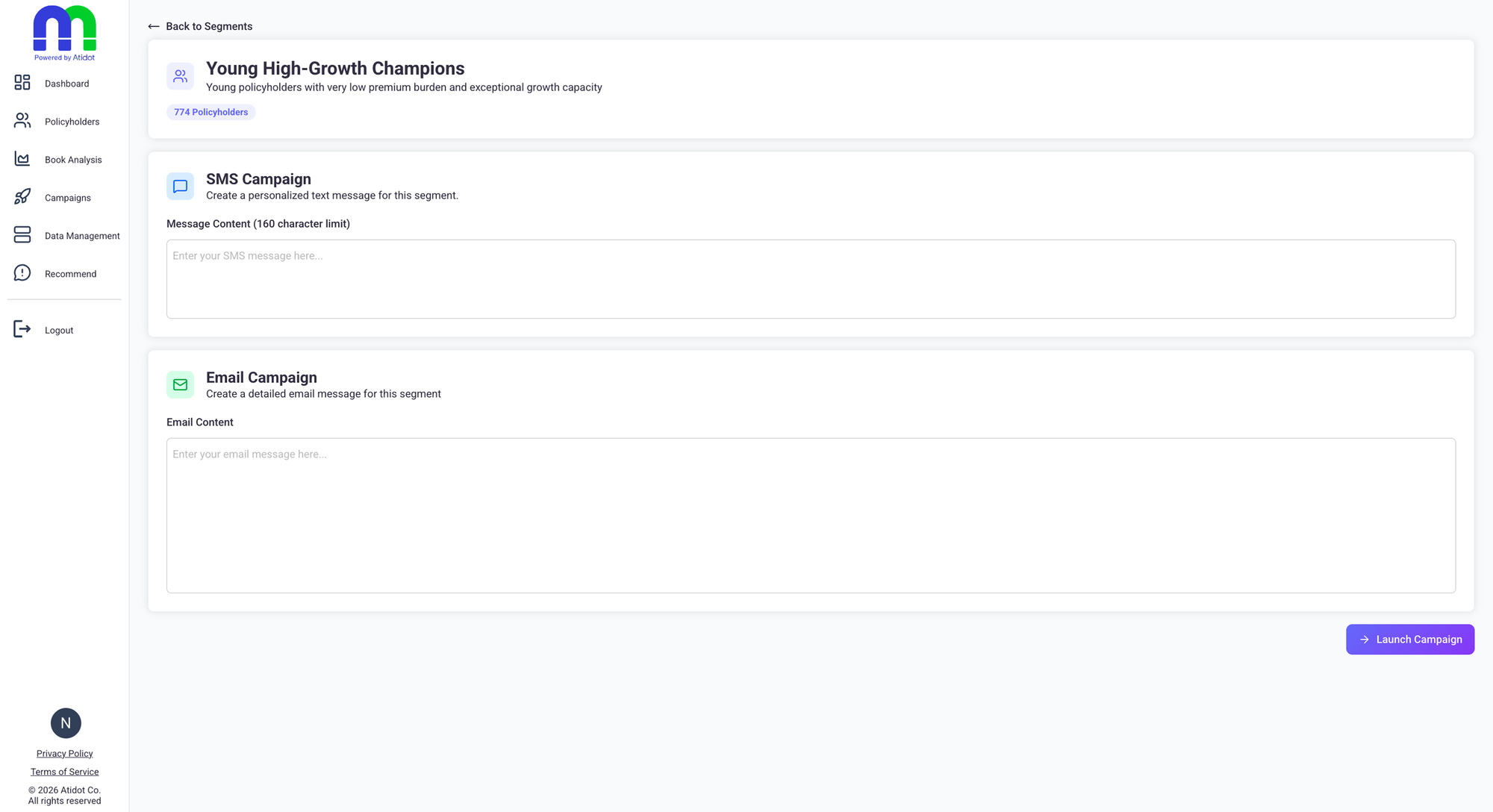
Research & strategy
Rather than start from the interface, I started from the business. I sat in on prospect meetings, watched sales demos, ran client workshops, led onboarding calls, and presented the platform directly to brokers and agents. Two constraints shaped the strategy: engineering capacity was limited, so a full rebuild was off the table, and clients would not adopt anything that asked them to leave their existing systems. So instead of a redesign wish list, I set one prioritization principle and ran every decision through it.
None of the agents we spoke to wanted another CRM. These teams had years of processes, habits, and probably a few emotional-support spreadsheets built around the tools they already had.
Move users from insight to action as fast as possible.
Cleaning up the interface
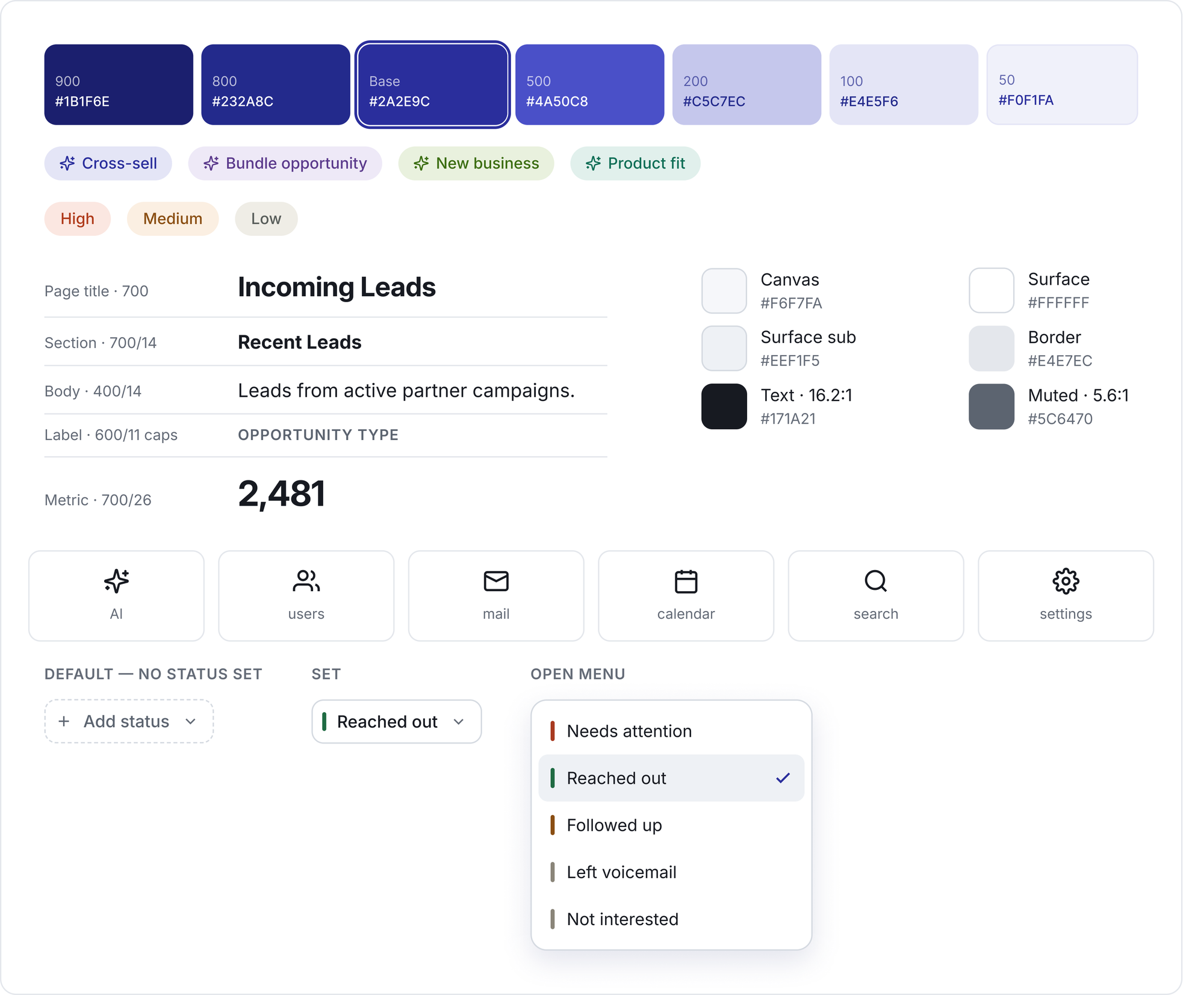
With engineering capacity fixed, I made the call to cut before adding. I audited every flow against usage data and feedback, then aligned engineering on what to remove and what to protect, so the limited runway went only toward moving users to action. Out came the redundant and unfinished flows that created cognitive load without driving anything, and the navigation labels changed with them, from what the system stored to what the agent was trying to do. Then I rebuilt the interface itself: one set of components instead of several near-duplicates, a type scale that held across pages, and a palette chosen for contrast and color-blind legibility rather than for looks. The outreach status set came out of the same work, giving agents the record of who they had already called that the platform had never kept.
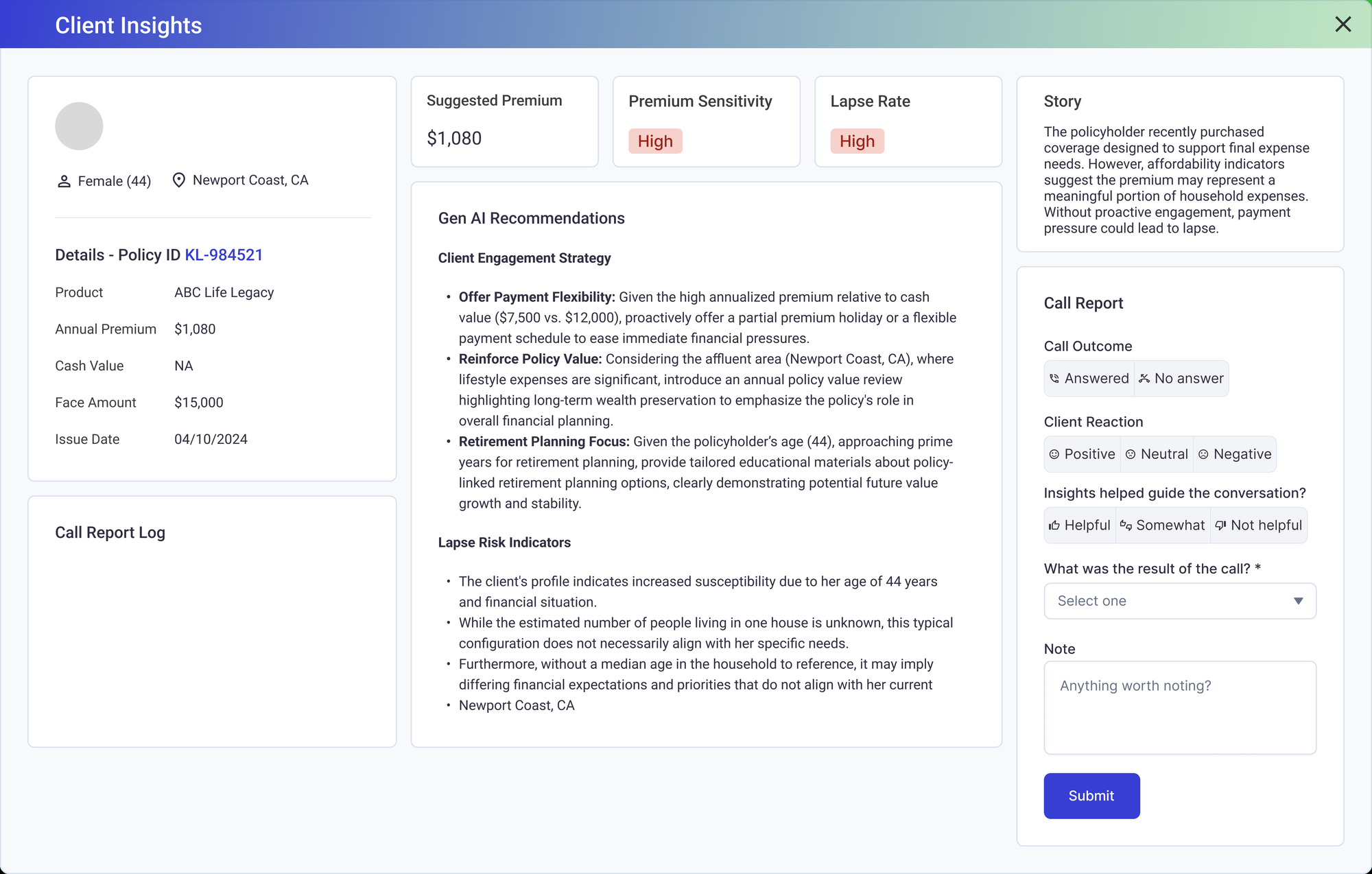
The status dropdown was quietly the most important thing we shipped. Every time an agent set one, we found out what happened to a prediction. Did they pick up? Did it convert? Was the model right, or just confident? We had a call log before, but unfortunately no one used it.
AI transparency & trust
Sitting in sales calls, I kept hearing the same objection: clients did not trust "black box" predictions. I treated trust as a product problem, not a modeling one, and prioritized three changes across the platform.
Prediction language
"Will lapse" became "likely to lapse based on…", acknowledging uncertainty without undermining confidence.
AI disclosure badges
Clear indicators on all AI-generated content, so users always knew what came from the model versus confirmed data.
"Why now" signals panel
The ranked factors behind each prediction, built with the data science team to surface the model's reasoning, so users saw the why, not just a risk score.
"What is fact? What is a prediction?"
Agent, usability session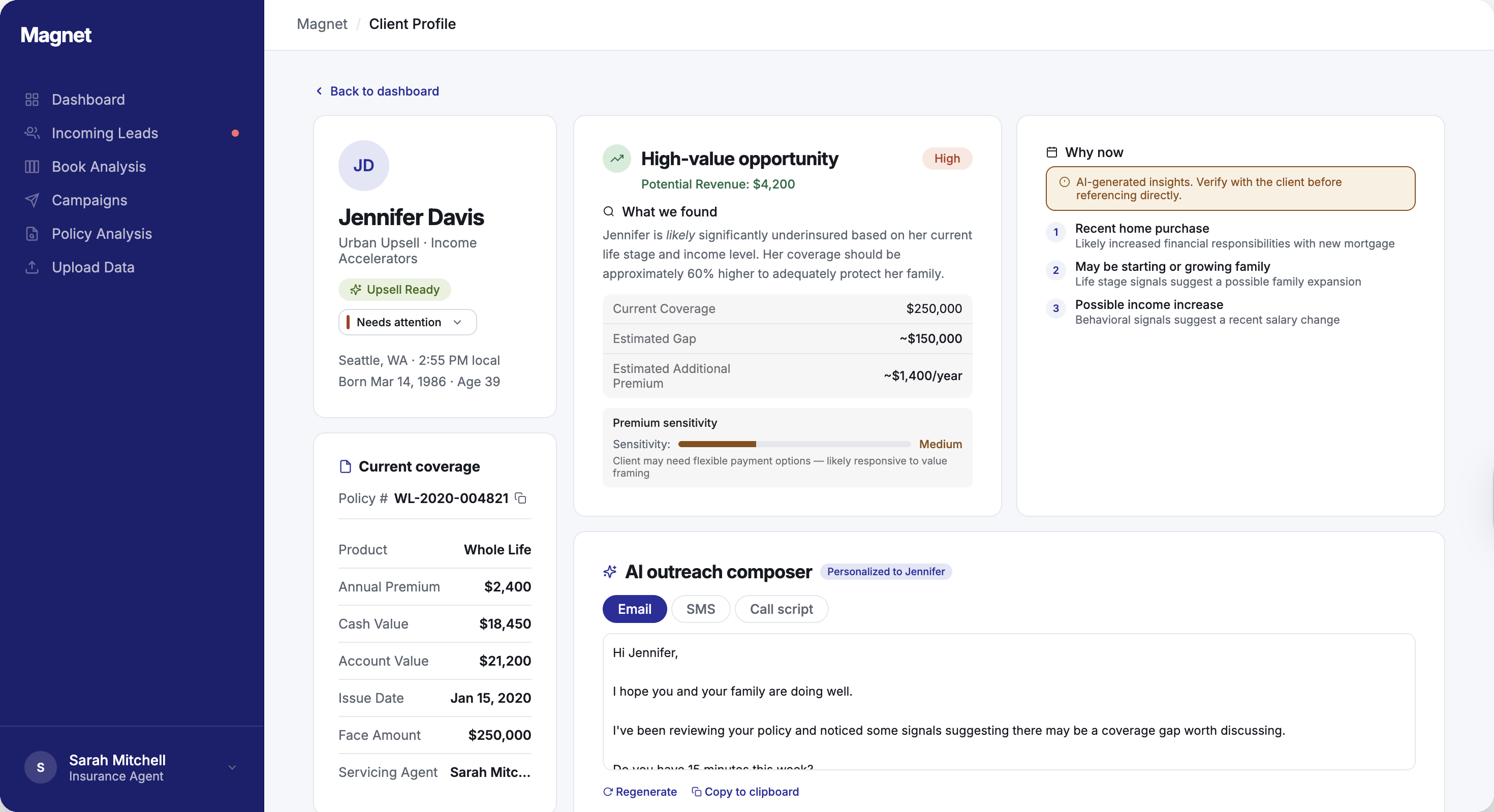
AI outreach composer
The same gap surfaced in nearly every customer conversation: users trusted the insight but froze on the next step.
"What should I say when I pick up the phone? My model said you are at risk of lapse?"
Agent, usability sessionI prioritized an outreach composer that generates personalized outreach (email, SMS, or call script) directly from the platform's segmentation, drawing on the exact signals that flagged each policyholder. I scoped it deliberately: generate from data we already had, so we delivered real value without an integration lift engineering could not afford.
This wasn't about AI writing being trendy. It was the most direct way to make the product usable day to day.
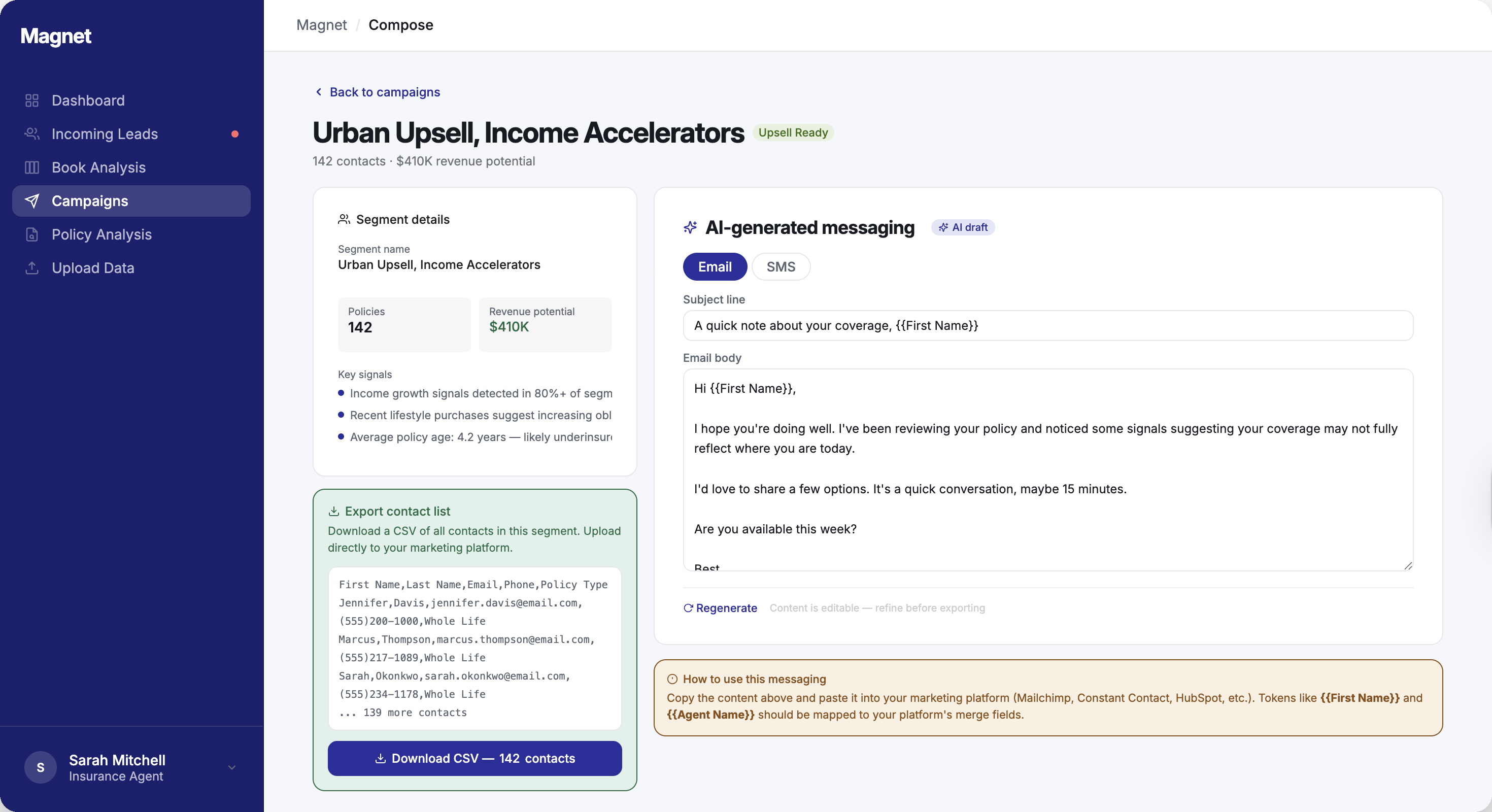
Campaign page
One of the most requested capabilities was a way to act on a segment without a full CRM integration, which no client wanted to take on. I designed a campaign page where users view a segment of flagged policyholders and download or copy the list straight into their own marketing systems.
No integration, no new tool to learn, and users could go from insight to a running campaign in minutes.
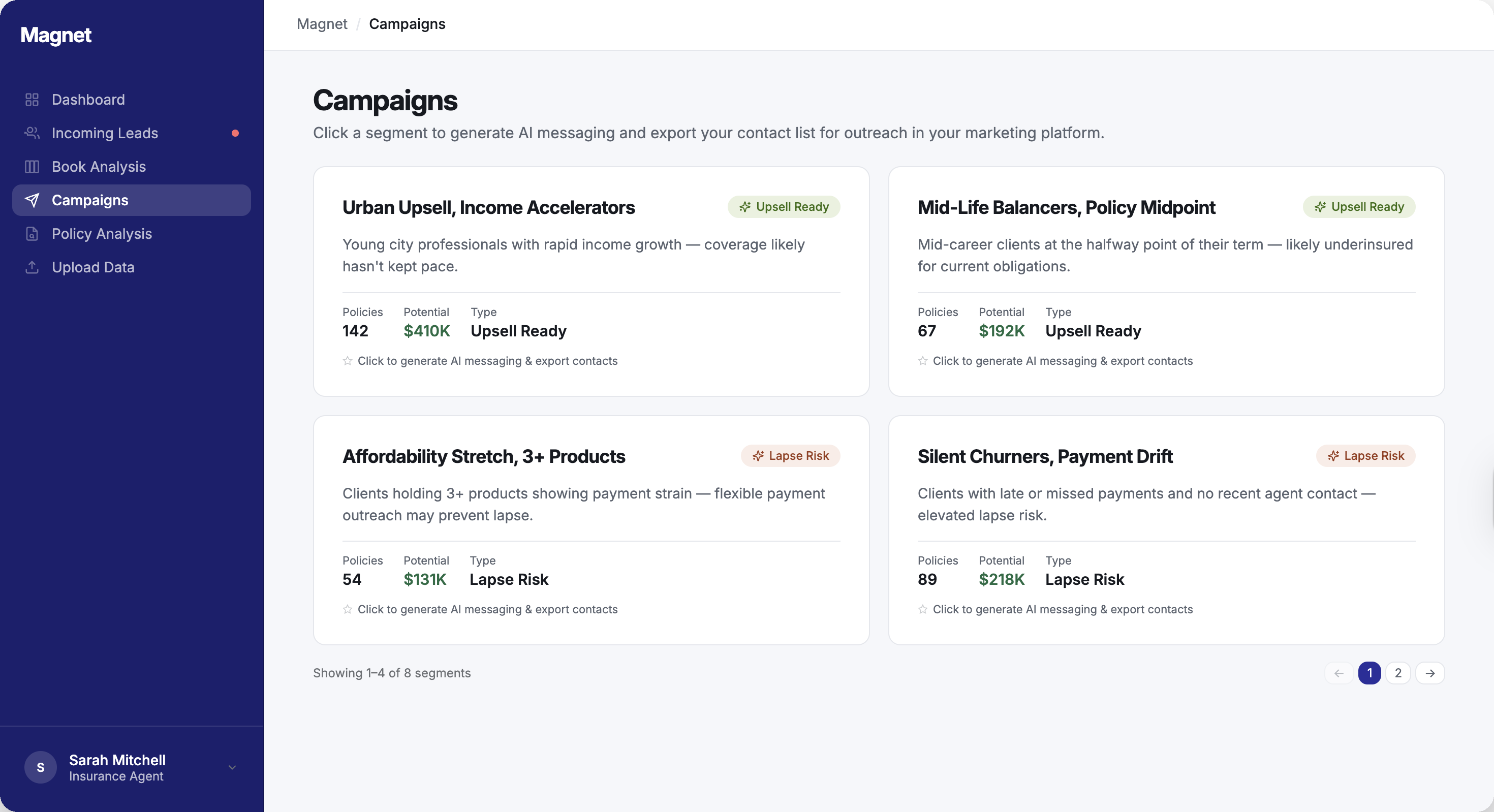
Platform pages
A walkthrough of the redesigned platform, from the dashboard to the moment an agent takes action.
The bet I killed
I championed an AI chat assistant for the dashboard, built a prototype using Claude Code, and pushed for it internally. Then I tested the idea in client interviews, and the demand was not there. We were about to build the wrong feature.
"If the platform is easy to use, I shouldn't be needing to ask the chat something."
Client, during a feedback sessionMy interviews caught it before we shipped, and I redirected our limited engineering and design capacity to the work that actually moved users from insight to action.
What I learned
This was the first time I owned a product end to end, not just the design but the product decisions behind it. I wasn't handed a spec. I decided what to build, what to cut, and how the platform should evolve, and then I designed it. Owning the product and the design at once was a rare opportunity, and it changed how I understand my own role.
Honestly? The thing I'm proudest of isn't something I shipped. It's that I actually learned the business. Sitting in on sales calls, demos, and workshops taught me things no amount of staring at the interface ever could. Turns out eavesdropping on sales is a legit design method. Who knew.
Sell impact, not features. Sitting in on sales calls taught me the difference between how product teams and sales teams communicate. I would explain features; they would explain impact. Prospects cared far more about what the product could do for them than how it worked, and that reshaped how I present design decisions to stakeholders and users alike.
AI transparency is a design problem. Trust doesn't come from a better algorithm. It comes from helping users understand what the AI is telling them and why. Making predictions feel explainable was some of the most impactful work I did on this project.
Good design requires advocacy. With limited engineering resources and competing priorities, design improvements don't happen by default. I learned to make the case for them in terms the business understood, and to prioritize ruthlessly so that every change we shipped actually mattered.
Product strategy and design are inseparable. Deciding what to cut was as much a design act as drawing the screens. Owning both let me carry an idea from insight to shipped product without losing the thread, and it's the way I want to keep working.